Compliance
SMS Consent & Opt-In Disclosure
Last updated: May 2026
Brand Identification
This SMS messaging service is operated by Locke Identity Networks Inc. under the product name Locke Armory, an enterprise credential management platform for organizations.
What This Service Does
Organization administrators receive security alert messages, including account notifications and verification codes, for shared service accounts managed within Locke Armory. These messages are sent to phone numbers that administrators explicitly provision within the application to facilitate secure access to shared credentials.
Who Receives Messages
Only authenticated organization administrators who explicitly provision phone numbers within the Locke Armory admin console will receive SMS messages. End users and non-administrators do not receive SMS messages through this service. Each phone number must be manually added and confirmed by an authorized administrator within the authenticated application.
How Consent Is Collected
Consent is collected through an explicit, multi-step opt-in process within the authenticated Locke Armory admin console:
-
Admin logs into Locke Armory
The administrator authenticates into the Locke Armory enterprise application using their organization credentials and passkey.
-
Admin navigates to Settings
Within the admin console, the administrator navigates to the Settings page where organization and account preferences are managed.
-
Admin locates "SMS Notifications" card
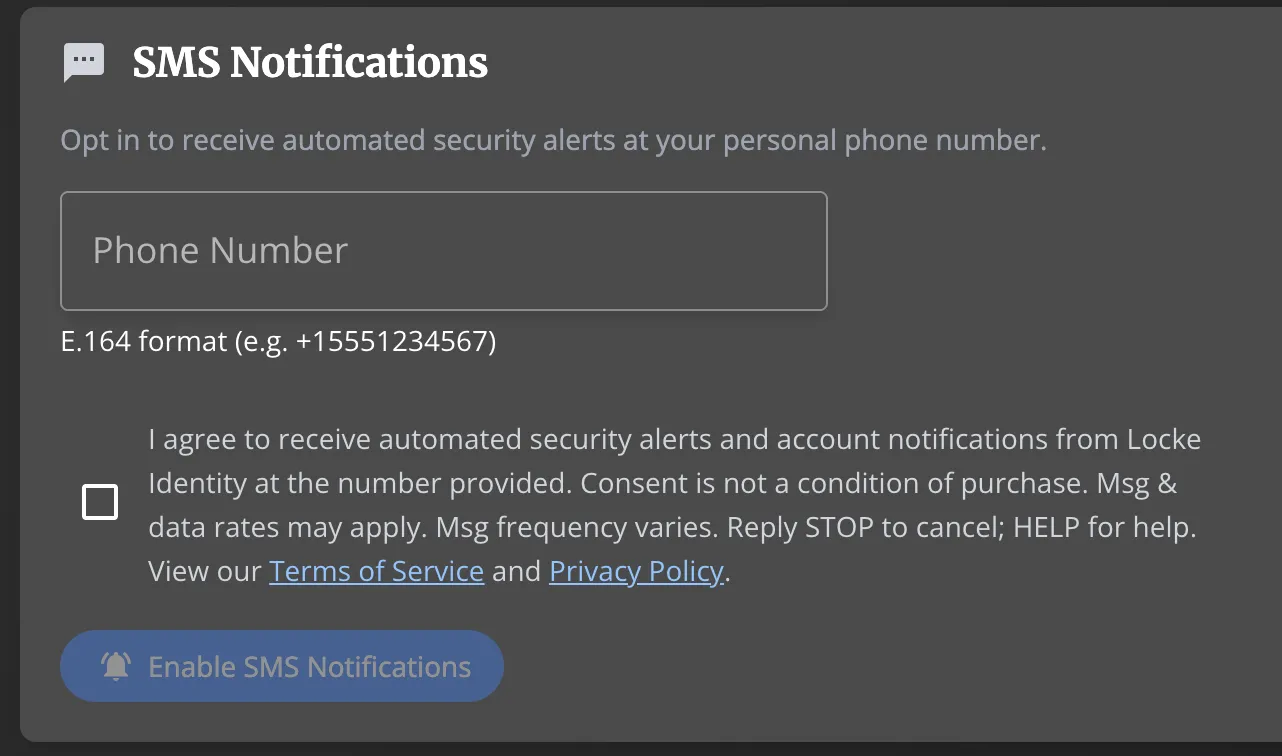
The Settings page contains an "SMS Notifications" section with a phone number input field and a mandatory consent checkbox. The card clearly states: "Opt in to receive automated security alerts at your personal phone number."
-
Admin enters their personal phone number
The administrator enters their personal phone number in E.164 international format (e.g., +15551234567). This is the number where they will receive security alert messages.
-
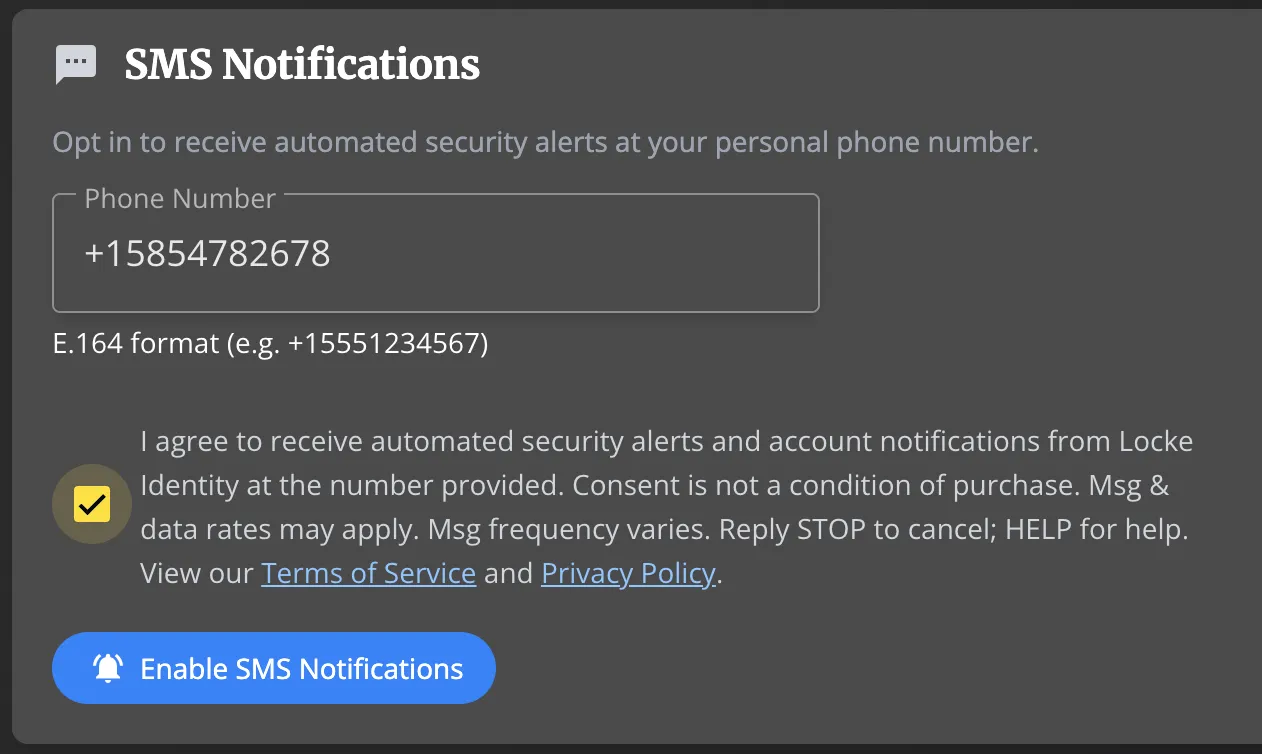
Admin checks mandatory consent checkbox
The administrator must explicitly check a consent checkbox that is unchecked by default. The checkbox text reads exactly:
"I agree to receive automated security alerts and account notifications from Locke Identity at the number provided. Consent is not a condition of purchase. Msg & data rates may apply. Msg frequency varies. Reply STOP to cancel; HELP for help. View our Terms of Service and Privacy Policy."
This is a separate, affirmative action — consent is freely given and not bundled with any other action or required to complete a purchase or use the service.
-
Admin clicks "Enable SMS Notifications"
The "Enable SMS Notifications" button is disabled until both the phone number is entered and the consent checkbox is checked. Upon clicking, consent is recorded server-side with the administrator's identity (personame), phone number, timestamp (UTC), and IP address for audit purposes.
Required Disclosures
The following disclosures are presented to the administrator at the point of consent (within the SMS Notifications consent form in Settings):
- Consent is not a condition of purchase: SMS messaging is not required to use Locke Armory. Consent is freely given and not bundled as a condition of purchase or service.
- Message frequency: Approximately 1–5 messages per day, based on account activity.
- Message and data rates may apply.
- Opt-out: Reply STOP to any message at any time to stop receiving messages.
- Help: Reply HELP to any message for support information.
- No third-party sharing: SMS opt-in data and consent will not be shared with any third parties.
- Policies: Terms of Service and Privacy Policy
How to Opt Out
You can stop receiving SMS messages at any time through either of the following methods:
- Reply STOP to any message you receive from us. You will receive a single confirmation message and no further messages will be sent to that number.
- Deactivate the number in Locke Armory — an organization administrator can remove or deactivate a provisioned phone number at any time from the SMS Phone Numbers section of the admin console.
After opting out, you may opt back in at any time by re-provisioning the phone number through the same consent flow described above.
Help & Support
If you reply HELP to any message, you will receive a response with support contact information. You may also reach us directly:
- Email: support@lockeidentity.com
- Website: lockeidentity.com/support
Contact Information
Locke Identity Networks Inc.
260 E Main St, Suite 6894
Rochester, NY 14604
Email: support@lockeidentity.com